Posts tagged "pic":
Neat, simple VCS friendly images
Sometimes a picture says a thousand words. In software documentation maybe even ten times that. And even a thousand words can be an impenetrable wall for software collaborators to comprehend correctly, and in software details truly matter. Hence, pictures are invaluable!
But how to explain your project with pictures? You detest the idea of adding binary images to your pristine git repository. They're also difficult to modify or to diff. How about a diagram drawing tool? Will all your collaborators have access to it?
I've been wrestling with this problem for a long time but now think I'm closer to a solution: pic language! It's been around from since 1982, but I've completely missed it.1
Pros
- At least three implementations that are easy to install and have a small footprint.
- Fast to learn, in my opinion.
- The language is from the 80s; probably will be supported in some form for another couple of decades.
- Has macros! (See Cherry on top: macros!)
Cons
- No GitHub or GitLab preview implementation (at the moment). Preview exists for Fossil, though.
Demo time!
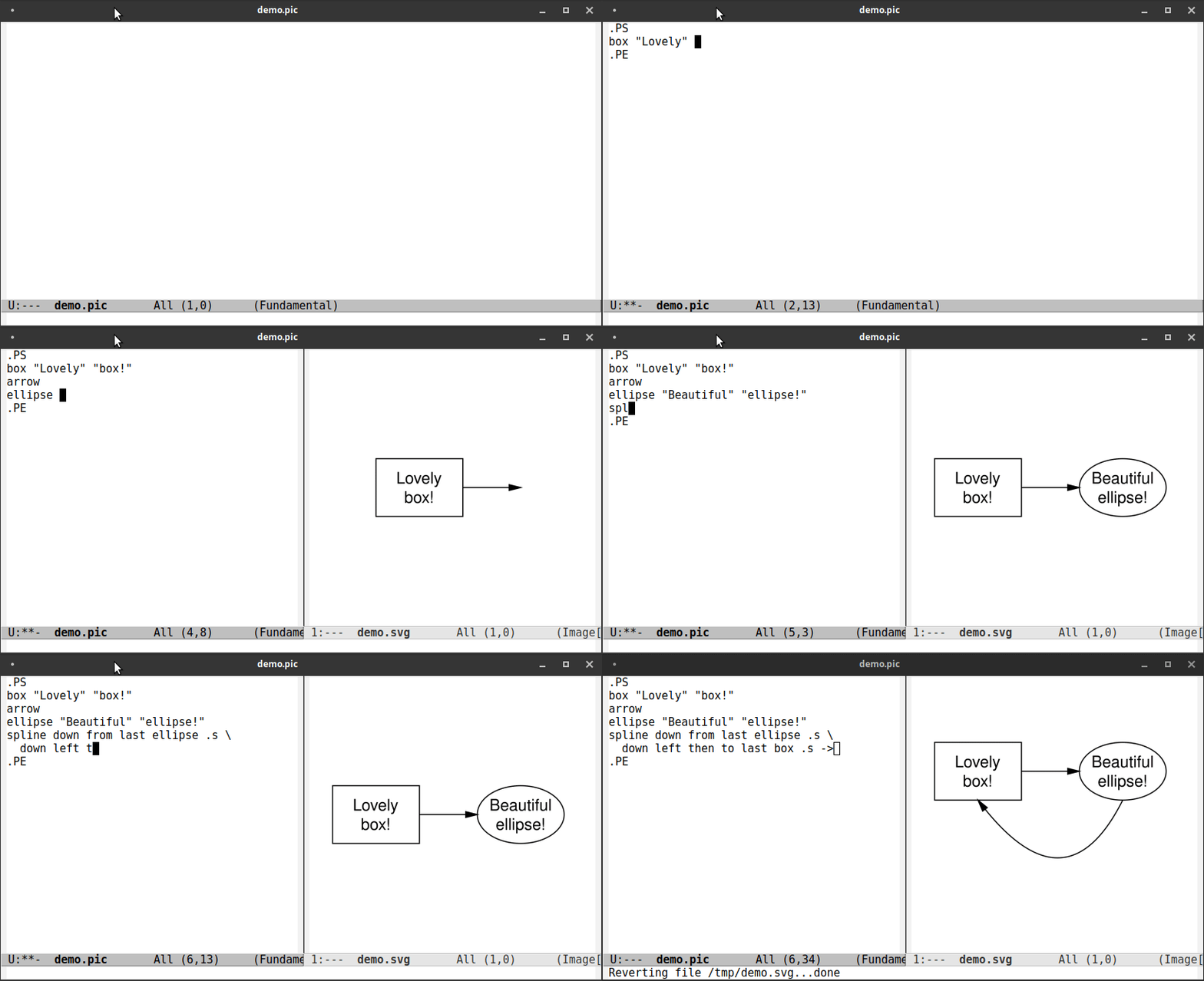
I edit pic code saving after each step as I go. I've configured Emacs to run a shell command to run pic conversion to SVG file after each save and to (re-)open the resulting SVG file.
How to get started
- Install
pic2plot(apt install plotutils). Write your pic code or take the snippet from below and save it to
image.pic..PS box "Lovely" "box!" arrow ellipse "Beautiful" "ellipse!" spline down from last ellipse .s down left then to last box .s -> .PE
- Run
pic2plot -T svg < image.pic > image.svg
And then add the pic-source to your git repository. And why not the image as well until GitHub or GitLab add preview feature for pic images — it's SVG, so it's almost fine, isn't it? Just tweak the bounding box, width and height first.
I chose pic2plot as that was the first thing I found. If your
distro or OS doesn't come with pic2plot, there are other
implementations as well that your OS might have or you could compile
yourself:
- dpic (
apt install dpic). Rundpic -v image.pic > image.svg. - pikchr: A new-ish implementation. There isn't yet an apt package
for it. It comes in a single C source file, seems easy to compile
(
gcc -DPIKCHR_SHELL -o pikchr pikchr.c -lm). Definitely worth checking out! Note that you need to drop the.PSand.PEtroff requests fromimage.pic. Runpikchr --svg-only image.pic > image.svg. - GNU pic for translating pic to groff or TeX toolchain. The
downside of course is that you need groff or TeX toolchain
installed. Comes as a part of groff toolchain in Debian at
least. Doesn't produce SVG, but PS or PDF. Run
pic image.pic |
    groff -T pdf > image.pdf
.
The aforementioned implementations are worth checking out also
because pic2plot has no UTF-8 support (ISO-8859-1 works for what
it's worth). Dpic and pikchr can handle UTF-8 out of the box. I
guess groff as well after some setup.
My Emacs demo setup
This is a quick hack, but works for me.2
(defun pic-name-as-svg (pic-file-name)
  (concat (file-name-sans-extension pic-file-name) ".svg"))

(defun pic-make-svg-of (pic-file-name)
  (shell-command
     (format "pic2plot -T svg < %s > %s" pic-file-name
             (pic-name-as-svg pic-file-name))))

(defun pic-preview (pic-file-name)
  (save-selected-window
    (let* ((svg-file-name (pic-name-as-svg pic-file-name))
           (revert-without-query
            (list (regexp-quote (abbreviate-file-name svg-file-name)))))
      (find-file-other-window (pic-name-as-svg pic-file-name) t))))

(defun pic-after-save ()
  (let ((pic-file-name (buffer-file-name)))
    (when (equalp (file-name-extension pic-file-name) "pic")
      (pic-make-svg-of pic-file-name)
      (pic-preview pic-file-name))))

(add-hook 'after-save-hook #'pic-after-save)
Your Emacs needs to have SVG preview capability
((image-type-available-p 'svg) returns t — or just load an SVG
image with Emacs and see). I think most out of the box Emacsen
have. At least Debian Emacs does. You can change the output (the
-T option) to png, gif, ps etc. if they work better.
Depending on your Emacs window size, you might want to modify how
Emacs' find-file-other-window splits the window; see emacs manual,
and particularly split-height-threshold and
split-width-threshold (which you can conveniently dynamically bind
with let, like revert-without-query, before calling
find-file-other-window).
Other roughly comparable software
I've tried Mermaid for markdown-like image creation and ditaa, svgbob for converting ascii-art to diagrams.
Now, to me, Mermaid is more difficult to install for standalone use (no apt package, brings down a bunch of node packages); doesn't produce as slick output as pic; and isn't as flexible as pic.
The other tools convert ascii art to diagrams. To me they have a couple of fundamental problems. First, no smooth curves, and resolution (text positioning, text size) is defined by the character grid. The other problem is that making changes to the ascii art, e.g. moving everything a couple of characters down to make space for a new box, is cumbersome even with e.g. Emacs artist mode. But in general I really like svgbob's laissez-faire style! See the extravagant demos!
There's also graphviz but it's best for visualizing graphs, not for generic drawing.
Cherry on top: macros!
.PS
define actor {
  $1: box $2;
  ypos = last box .s.y - 0.5;
  move right 1 from last box .e;
}

define action {
  arrow from ($1.x, ypos) to ($2.x, ypos) $3;
  ypos = last arrow .end.y - 0.5;
}

define finish {
  line down from $1.s to ($1.x, ypos);
}

actor(USER, "elisp" "programmer");
actor(CLERK, "clerk");
actor(DRAWER, "drawer");

action(USER, CLERK, "Could I please have" "some closing parens?");
action(CLERK, DRAWER, "search for" "available )))s");
action(DRAWER, CLERK, "Grab a bunch" "of )))s");
action(CLERK, USER, "Here you go! )))" "Have a nice day!");

finish(USER);
finish(CLERK);
finish(DRAWER);
.PE
The simple macros I've defined automatically create and move a
global y-coordinate ypos and draw action arrows between boxes
labelled with USER, CLERK, DRAWER defined with actor macro.
Resulting SVG image:
Since pic can import other files you could basically create a library of macros for certain specific tasks like this. In fact, that's what e.g. Kernighan has done with grap. There are many other examples in the troff toolchain.
Useful links
- https://pikchr.org/home/uv/pic.pdf — Brian W Kernighan's PIC-manual
